
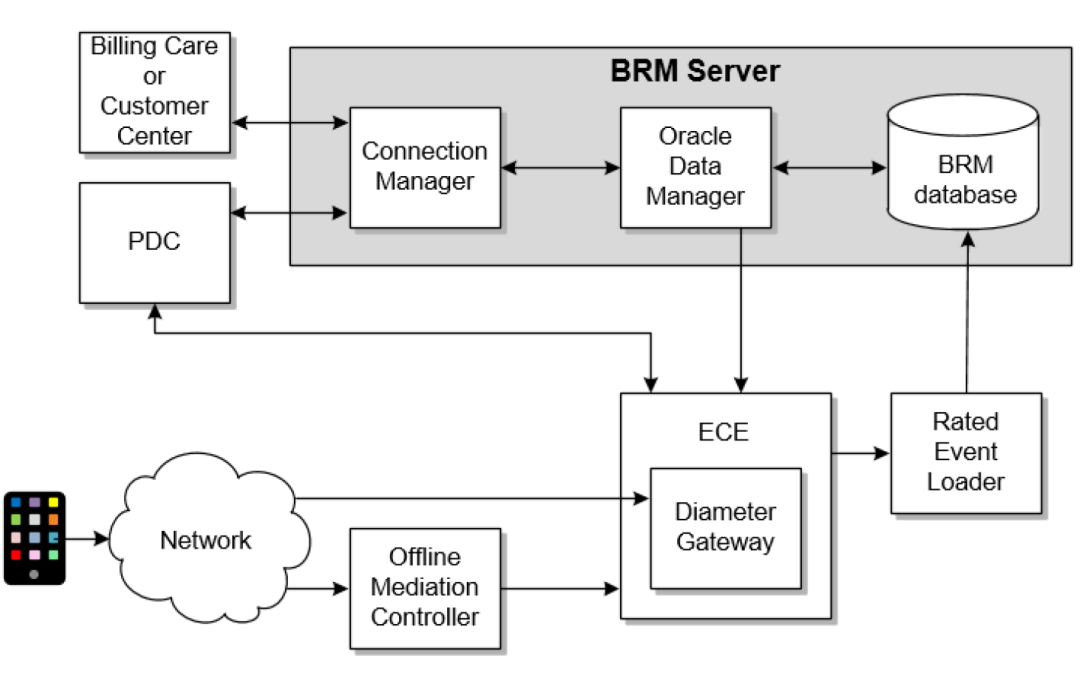
Oracle Communications Billing and Revenue Management (BRM) is one of the most capable, and most misunderstood, platforms in the billing space. If you’re in Finance, RevOps, or leadership, your technical team is likely navigating constraints and realities that don’t always surface in planning conversations.
Here are five things your BRM team already understands and wishes the broader business did too.
1. It's Built On Four-Tier Architecture
BRM separates concerns into four distinct layers:
- Applications (client interfaces like Billing Care)
- Business Processes (Connection Managers and ECE)
- Data Management (Data Managers that translate operations into SQL)
- Data (the BRM database and external systems like payment processors)
This isn’t just structural tidiness. The separation is what makes failure recovery predictable. If a Data Manager goes offline, the Connection Manager keeps retrying until it reconnects. If a client crashes mid-transaction, the database rolls back cleanly. No partial records. No silent corruption.
When troubleshooting issues, knowing which tier a problem originates in narrows the search significantly. A billing failure and a payment failure often look similar on the surface but originate in different tiers entirely.
2. There Are Two Separate Charging Engines That Run Independently
Usage charging, phone calls, data downloads, API consumption, is handled by the Elastic Charging Engine (ECE) in real time.
Subscription charging, monthly fees, purchase fees, cancellation fees, is handled by the BRM server and runs at billing time.
They use different data sources, different timing, and different configurations. ECE looks up pricing from its own cache. The BRM server looks up recurring charges from the BRM database. Both need to agree on what a customer owns for the system to behave correctly.
This split is one of the most common sources of reconciliation confusion. A pricing change applied in PDC may propagate to ECE correctly but behave differently for subscription charges or vice versa.
3. Billing Cycles and Accounting Cycles Are Not The Same
The accounting cycle always runs monthly. It compiles balance impacts, applies recurring charges, and closes out bill items internally.
The billing cycle determines when a customer receives a payment request and that can be monthly, quarterly, annually, or any whole multiple of one month.
A single account can also carry multiple bill units, each with its own billing cycle, billing day of month, payment method, and accounting type. This is intentional and powerful, but it means a “bill” and an “accounting period” are not interchangeable terms in BRM.
When a customer reports a billing discrepancy, the first question should be whether the issue lies in the accounting cycle (balance accumulation) or the billing cycle (payment request). They fail differently and require different remediation paths.
4. Currency Balances Are Calculated, Not Stored
Non-currency balances, like included minutes, are stored directly and represented as negative numbers (credits the system owes the customer). But currency balances, the dollar amount a customer owes, are never stored as a single field. They’re calculated on the fly from bill items, A/R items, adjustment items, dispute items, and more.
This is why a balance of $50 might be $60 in usage fees minus a $10 credit adjustment. The total looks simple but the composition isn’t.
When Finance asks, “Why does the balance show X,” the answer is almost never a single line item. Understanding the item types that contribute to a balance, and which events create them, is essential for any reconciliation work.
5. Most Configurations Require No Code, But Important Customizations Do
Standard product offerings, billing setup, account creation workflows, and payment method configuration can all be managed through BRM’s GUI tools and configuration files without any programming. This covers the vast majority of day-to-day operational changes.
However, creating custom services, modifying rating logic, building integrations with external systems, and customizing event notifications all require source code changes. The line between “configurable” and “requires a developer” is clearly drawn but it’s often misunderstood in planning conversations.
Scope conversations that treat all BRM changes as equivalent will consistently underestimate effort. Mapping your change backlog against which tier it touches, and whether it requires code, is one of the most useful things a team can do before committing to a delivery timeline.
The Bigger Picture
Most BRM issues don’t come from the system “failing.” They come from a gap in understanding how the system is designed to behave.
When Finance sees a mismatch, when RevOps sees a delay, when leadership sees risk, your technical team is often mapping it back to:
- Which tier the issue originated in
- Which charging engine handled it
- Which cycle it belongs to
- How the balance was constructed
- Whether the change required code
Understanding these issues isn’t about becoming technical expert. It’s about making better decisions, asking better questions, and aligning expectations with how BRM actually works.
The fastest way to solve billing problems isn’t reacting to symptoms, it’s understanding the system underneath them.